Gemini Notebook Drawing AI Photo Editing Prompts 2026
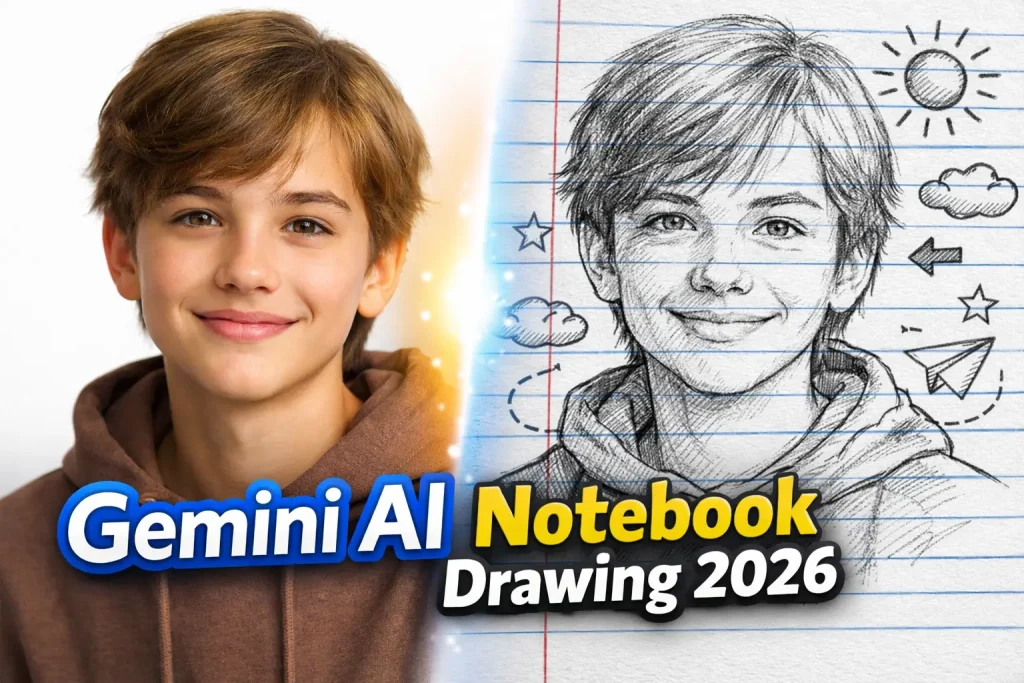
If you’ve been scrolling through Instagram or TikTok lately, you’ve probably seen those beautiful sketch-style images that look like they were drawn in a school notebook. The twist? They’re not hand-drawn. They’re created using Google Gemini.
This is where things get interesting. Instead of spending hours learning tools like Adobe Photoshop, you can now upload a photo, write a simple instruction, and let AI turn it into art. That instruction is what we call a prompt, and in 2026, prompts are doing the heavy lifting.
This article will walk you through everything in a practical, easy-to-follow way. You’ll understand how these prompts work, why this style is trending, and how you can create your own viral notebook drawings without any design skills.
What is Notebook Drawing Editing Prompt?
This trend is powered by prompt-based image transformation. You give AI a direction, and it reimagines your image in a new artistic form.
With Google Gemini, prompts are not just simple commands. They act like detailed creative instructions. You’re telling the AI what to keep, what to change, and how the final image should feel.
For example, when you ask for a “notebook drawing,” you’re combining multiple ideas:
- A realistic subject (your photo)
- A drawing style (pencil, crayon, or ink)
- A background (lined notebook paper)
- A mood (soft, playful, or artistic)
This layered instruction is part of what’s known as Prompt Engineering, and it’s the reason some images look average while others look amazing.
The Notebook Drawing Style Explained (Why It Feels So Real)
There’s a reason this style connects with people instantly. It taps into something familiar.
Visual Feel of Notebook Drawing Style

Think about your school days. Rough sketches, blue lines, red margins, random doodles in the corner of the page. That imperfect, slightly messy look is exactly what makes these AI images feel authentic.
Unlike polished digital edits, notebook drawings:
- Feel personal and handmade
- Have small imperfections that add character
- Create a storytelling vibe
And that’s why they perform so well on social platforms—they don’t look like typical AI content.
Why This Trend Is Exploding in 2026
This isn’t just another editing style. It’s part of a bigger shift in how people create content.
Tools powered by Generative AI are making creativity accessible. You no longer need technical skills. You just need ideas.
Another reason is speed. Platforms like CapCut and Media.io have made quick editing popular, but Gemini takes it further by removing manual work completely.
Most importantly, this style stands out. In a feed full of filters and presets, a notebook sketch instantly catches attention.
How to Write Better Prompts
Here’s something most beginners don’t realize: the quality of your result depends more on your prompt than the tool itself.
A strong prompt doesn’t just say “make it a sketch.” It guides the AI step by step.
Instead of thinking like a user, think like a director. You’re describing a scene.
For example, a basic prompt might give you an average result. But when you add detail—like pencil strokes, lighting, shadows, and background elements—the output improves dramatically.
You should always:
- Tell the AI to keep the face and expression the same
- Clearly define the art style
- Describe the notebook background
- Add small details like shadows or hand-drawn effects
This structured thinking is what separates viral images from forgettable ones.
Best Gemini Notebook Drawing AI Prompts
Let’s move into practical examples. These are not generic prompts—they’re written in a way that aligns with how Gemini understands instructions.
Classic Pencil Notebook Sketch
Create a realistic pencil sketch of the uploaded photo on lined notebook paper. Keep the face, hairstyle, and expression exactly the same. Use soft pencil shading, fine strokes, and natural depth. Add slight imperfections and a visible hand holding a pencil near the drawing. Make it look like it was drawn in real life. High detail, 4K quality.
This prompt works well when you want something that feels almost real.
Crayon Notebook Drawing Style
Transform this image into a colorful crayon drawing on blue lined notebook paper with a red margin. Keep all facial details unchanged. Use rough, uneven strokes and bright playful colors. Add doodles like sun, clouds, birds, and small houses around the subject. Make it look like a child’s drawing. High quality.
This one is perfect for social media because it feels fun and eye-catching.
Ink Pen Doodle Notebook Style
Generate a black ink doodle drawing of the subject on notebook paper. Maintain full facial accuracy. Use bold outlines, sketchy lines, and handwritten notes around the drawing. Add arrows, labels, and creative annotations to enhance the notebook effect.
If you want something creative and slightly different, this style performs very well.
Watercolor Notebook Art
Convert this image into a soft watercolor painting on notebook paper. Use smooth blending, light color splashes, and artistic brush textures. Keep the face accurate and natural. Add subtle handwritten elements around the subject.
This gives a more artistic and premium look.
Hyper-Realistic Artist Sketch
Create a hyper-realistic hand-drawn sketch on notebook paper. Include detailed shading, strong depth, and realistic lighting. Keep the face exactly the same. Show a hand sketching the portrait for a real-life effect. Ultra HD, cinematic quality.
This is ideal if you want a professional, portfolio-level result.
Step-by-Step: How You Actually Use These Prompts
The process is simple, but small details matter.
You start by opening Google Gemini. Upload your photo, then paste one of the prompts above. Once the image is generated, don’t stop there. Try adjusting small parts of the prompt.
For example, you can change:
- “pencil sketch” to “ink sketch”
- “soft shading” to “high contrast shading”
This trial-and-error approach is how you refine results.
Where These Images Work Best
These edits are not just for fun. They’re actually very useful in different areas.
For content creators, they’re perfect for thumbnails, reels, and profile pictures. A unique visual style helps you stand out instantly.
For personal use, people are turning their memories into creative artwork. It’s becoming common to use these images in digital scrapbooks or even print them as gifts.
For businesses, this style is being used in branding and marketing because it feels more human compared to traditional ads.
Limitations You Should Know Before Using Gemini
Even though Google Gemini is powerful, it’s not perfect.
Sometimes the face might change slightly. Other times, the AI might add extra elements you didn’t ask for. This usually happens when the prompt is not specific enough.
Another challenge is consistency. You might get a great result once, but repeating the exact style can be tricky.
That’s why patience and refinement are part of the process.
Best Practices That Actually Improve Your Results
If you want better output consistently, focus on clarity.
Always tell the AI what must stay unchanged. Be specific about style and environment. Avoid vague instructions.
Also, don’t try to add everything in one prompt. Keep it structured and natural.
The biggest improvement comes from testing. Even small changes in wording can lead to noticeably better images.
Content Strategy Around Gemini AI Prompts
If you’re creating content for a website, this topic has strong SEO potential.
You can build a full topical cluster around it. Your main page can target AI photo editing prompts, and then you can create supporting articles on:
- Gemini-specific prompts
- Cartoon AI styles
- Realistic portrait prompts
- Social media editing trends
This approach builds authority and helps you rank faster.
Conclusion
Gemini Notebook Drawing AI prompts are not just a trend—they’re part of a bigger shift toward AI-powered creativity. What used to take hours in tools like Adobe Photoshop can now be done in seconds with the right prompt. And the best part is, you don’t need to be a designer. You just need to understand how to describe what you want. Once you get that right, the possibilities are almost endless.