Tokyo Drift Reels Video Editing Tutorial for Instagram Trends
Tokyo Drift style edits have become very popular on short-video platforms like Instagram Reels and TikTok. These edits are inspired by fast-paced car drifting scenes and cinematic racing visuals. Creators use quick cuts, energetic music, and stylish effects to make short videos that grab attention within seconds.
The editing style focuses on speed, rhythm, and visual impact. Even a short 6–10 second video can feel exciting when the clips are synced perfectly with music. This guide explains the full process of creating a Tokyo Drift-style reel using simple editing techniques and popular mobile apps.
Many beginners look for Tokyo drift reels video editing free tutorials to start learning the trend. With the right tools and a little practice, anyone can create eye-catching drift edits for social media.
Tokyo Drift Reels Video Editing Tutorial?
Tokyo Drift editing is a short-form video style inspired by drift racing culture and cinematic car scenes. The editing focuses on fast movement, dramatic transitions, and music synchronization. These elements create a high-energy visual experience that fits perfectly with short videos.
This style is commonly used for car clips, action shots, travel moments, and aesthetic edits. The idea is simple: combine quick visuals with rhythmic editing to create a powerful and engaging reel.
Key Features of Tokyo Drift Edits:
- Fast-paced transitions between clips
- Beat-sync editing with music
- Motion blur and camera shake effects
- Cinematic color grading and contrast
- Short clips with dynamic movement
Why Tokyo Drift Edits Are Trending on Instagram Reels
Short-video platforms reward content that captures attention quickly. Tokyo Drift edits work well because they combine movement, music, and visual effects in a short time frame. This makes the videos exciting and highly shareable.
Many creators also use this tokyo drift reels video editing style to transform normal clips into cinematic reels. Even a simple car or street clip can look dramatic when edited with speed ramps and transitions.
Reasons This Tokyo Drift Reels Video Editing Goes Viral:
Because of these reasons, drift-style edits often perform well on social media algorithms.
Best Apps for Tokyo Drift Reels Video Editing
Choosing the right editing app makes the process easier. Many mobile editors already include transitions, effects, and music tools that help create this style.
Mobile Apps
- CapCut: A beginner-friendly editor with trending templates and effects
- Alight Motion: Good for advanced animation and motion graphics
- VN Video Editor: Clean interface with professional editing tools
Desktop Software
- Adobe Premiere Pro: Powerful software for detailed editing and color grading
- After Effects: Ideal for complex motion effects and cinematic transitions
Mobile apps are perfect for beginners, while desktop software offers more advanced control for professional editors.
How to Make Tokyo Drift Reels Video Editing (Step-by-Step Guide)
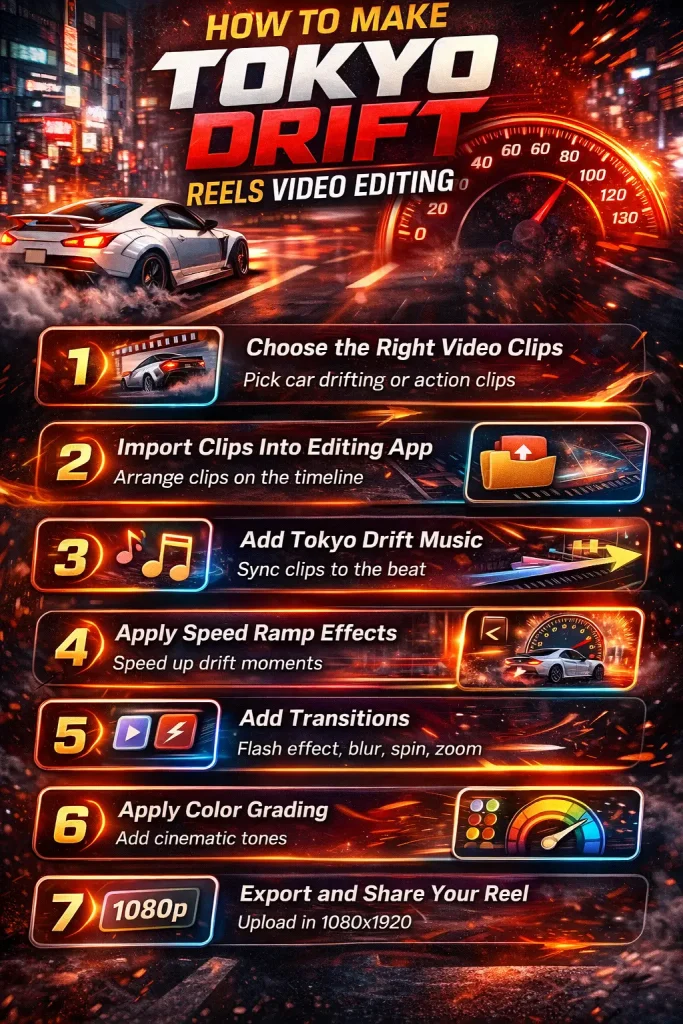
Creating this type of reel does not require complex editing skills. The process mainly focuses on clip timing, music synchronization, and visual effects.
Step 1: Choose the Right Video Clips
Start by selecting clips with movement or action. Drift shots, driving scenes, street footage, or cinematic visuals work best.
Keep each clip short. Clips between one and two seconds help maintain the fast editing rhythm.
Step 2: Import Clips Into Editing App
Open your editing application and create a new project. Import the selected clips and arrange them on the timeline.
Place the clips in the order that matches the flow of the music. This will help you create smoother transitions later.
Step 3: Add Tokyo Drift Music
Music is a key part of this editing style. Choose a track with a strong beat or dramatic drop.
When adding the audio to your timeline, mark the beat points. These beats will guide where you cut or transition between clips.
Step 4: Apply Speed Ramp Effects
Speed ramping adds excitement to the video. Increase the speed during fast movements and slow it down during dramatic moments.
This technique makes the edit feel cinematic and dynamic, especially during drift or turning scenes.
Step 5: Add Transitions
Transitions connect clips smoothly and maintain visual flow. Use quick transitions to match the rhythm of the music.
Examples include:
- Flash transition
- Motion blur transition
- Spin transition
- Quick zoom effect
Avoid using too many transitions so the video remains clean and professional.
Step 6: Apply Color Grading
Color grading enhances the overall visual style. Adjust brightness, contrast, and saturation to create a bold cinematic look.
Many editors prefer darker tones with neon highlights because they match the racing and night-drive aesthetic.
Step 7: Export the Final Reel
After finishing the editing process, export the video in high quality.
Recommended settings:
- Resolution: 1080 × 1920
- Format: MP4
- Frame rate: 30 or 60 FPS
Many creators search for tokyo drift reels video editing download guides to save their final videos in high quality before uploading them to social media.
Tokyo Drift AI Editing Trend
Artificial intelligence has introduced new possibilities in short-video editing. AI tools can automatically apply effects, transitions, and style transformations.
These tools analyze the clip and add cinematic motion effects that resemble drift edits. This saves time and makes the process easier for beginners. Use AI DP Photo Editing Prompts to make your desired pictures using AI.
Examples of AI Tokyo Drift Edits
- Car swap edits
- Character replacement scenes
- Meme-style cinematic edits
- Stylized racing transformations
Some editors experiment with tokyo drift reels ai tools to generate creative edits without spending hours on manual editing.
Best Effects Used in Tokyo Drift Reels
Visual effects play an important role in creating the high-energy drift aesthetic. When used properly, these effects make the video feel more cinematic. Popular effects include:
Using a combination of these effects helps create a dynamic and engaging reel.
Best Music for Tokyo Drift Reels
Music determines the rhythm of the edit. A strong beat makes it easier to synchronize clips and transitions.
Many editors prefer music styles that match the racing atmosphere. Fast or dramatic tracks usually work best.
Popular Music Types
The right audio track can completely change the mood of a reel and make it more memorable.
Tips to Make Your Tokyo Drift Reels Go Viral
Creating a viral reel requires both creativity and smart editing. Small adjustments in timing and visuals can make a big difference in viewer engagement.
Consider these practical tips:
Many beginners also explore tokyo drift reels templates to learn how professional editors structure their clips and transitions.
Tokyo Drift Reels Video Editing Templates
Templates are a great starting point for beginners who want to create drift edits quickly. These templates already include transitions, effects, and timing structures.
By replacing the original clips with your own footage, you can produce a professional-looking reel within minutes. This method also helps you understand how pacing and beat synchronization work in short videos. For other templates: you can try Bike Ride Slow Motion Templates
Templates are commonly available inside mobile editing apps and online editing platforms. They simplify the workflow and allow creators to focus more on creativity instead of technical editing steps.
Conclusion
Tokyo Drift Reels video editing has become one of the most exciting trends in short-video content. Its combination of fast visuals, rhythmic cuts, and cinematic effects makes it perfect for platforms like Instagram Reels.
Anyone can learn tokyo drift reels video editing style with simple tools and practice. By choosing the right clips, syncing them with music, and using motion effects wisely, creators can produce engaging reels that stand out on social media.